Article
How to Read a Pallet Manifest, Step by Step
Reading a pallet manifest comes down to four checks: descriptions and quantities, condition, real resale value, and red flags. Here's how to run them on every load before you bid.
 Zac Montgomery
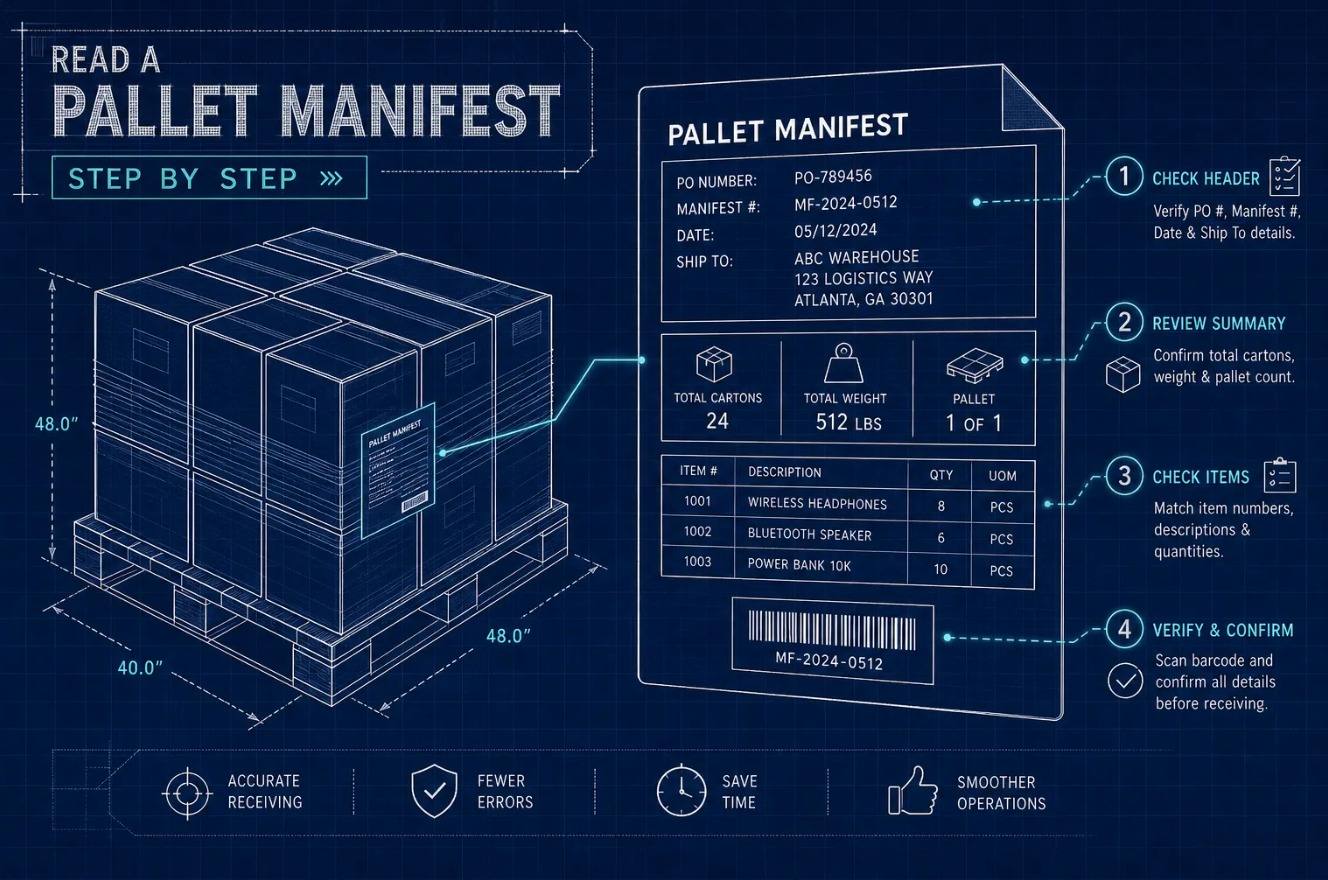
Reading a pallet manifest comes down to four checks, done in order: descriptions and quantities, condition, retail value versus what the stuff actually sells for, and red flags. Run those four on every load and you'll know whether the price makes sense before you bid.
A manifest is the itemized list a seller gives you before you buy. It might be a spreadsheet, a PDF or a table on a listing. The seller uses it to describe the pallet. You use it to decide if the price is fair. Read it critically and it's your best due-diligence tool. Skip that and it's just a number in a column someone else controls.
Key takeaways
- Start with the line items, not the total. Vague entries like "misc. home" can't support real margin math.
- Condition decides your margin. Ask the seller what's tested, what's returns vs. overstock, and what's damaged. If they can't say, price it like you don't know what works.
- Retail value is not what you'll get. Check sold prices, not asking prices or the manifest's MSRP.
- Quantities have to add up. Any gap between the line items and the advertised unit count is inventory you're buying blind.
- Watch the disclaimers. "Manifest for reference only" means treat the pallet like it has no manifest.
What's on a pallet manifest
Most manifests come as a spreadsheet or PDF with one row per product. Some sellers give you more detail than others, but a usable manifest always has the same core fields. Know them first and the four checks go a lot faster.
The core fields
The ones that matter most are the product description, SKU, UPC/EAN/ASIN and quantity. The UPC or ASIN is what lets you look up what the item actually sells for on eBay or Amazon, instead of trusting the seller's MSRP. If a high-dollar item has none of these identifiers, flag it right away.
Common abbreviations
Manifests are full of shorthand nobody explains. These are the ones you'll see most:
- SKU (Stock Keeping Unit): The seller's internal product code
- LPN (License Plate Number): A warehouse tracking label, not a product identifier
- AMZ (Amazon): The unit came from or was processed through Amazon
- ASIN (Amazon Standard Identification Number): Look it up on Amazon to see what it sells for
- UPC (Universal Product Code): Search it on eBay sold listings for real prices
- Ext. retail (Extended retail): Quantity × unit retail for that row
Logistics, photos and return reasons
A good manifest also shows extended retail, a total retail figure, condition grade, return reason and notes on packaging or missing parts. Pallet count, weight and dimensions let you estimate freight before you bid, and freight is part of your real cost.
Don't treat photos as proof. They're often a stock shot of the pallet or the listing, not a picture of every item on the manifest.
Return reasons are worth reading when the seller includes them. Electronics where most rows say "defective" or "missing parts" is a very different load than one where most say "changed mind."
Step 1: Check the descriptions and quantities
The most common beginner mistake is jumping straight to the total retail number. That total is built from the line items. If the line items are vague, missing or can't be checked, the total means nothing. Start at the item level and work up to the total, never the other way around.
Look up the UPC or ASIN before you bid
Copy the UPC or ASIN from the manifest. Search eBay sold listings, or check what it's actually going for on Amazon. You want the price buyers are paying today, not the retail price on the sheet.
Do the highest-dollar rows first. If your top ten rows by retail hold up against real sold prices, the rest of your math has a solid base. If several come back way under what the manifest says, redo your whole estimate before you bid.
Make the quantities add up
The advertised unit count only means something if the line items match it. Say a manifest advertises 48 units but the rows only add up to 31. Those 17 units aren't on the list, so you have no idea what they are. Price them like a gamble, not like verified product.
A quantity column that doesn't add up is one of the clearest signs a manifest is old, rebuilt or incomplete.
Step 2: Ask about condition
Condition drives the whole margin. A pallet that's mostly salvage needs completely different math than one that's open box or new overstock. Don't just go off whatever grade is on the listing. Ask the seller before you bid.
What to ask
- Is any of it tested?
- How much is customer returns vs. overstock or shelf pulls?
- Is anything damaged, opened or missing parts?
- Was it graded item by item, or is there one grade on the whole pallet?
If they can't answer, price it like you don't know what works. "Customer returns, untested" tells you nothing about whether stuff works. It just tells you where it came from.
What the answers mean for your price
- Mostly new or overstock: Least work, sells closest to retail
- Open box: Checking for missing parts
- Tested and working: Already sorted for you
- Customer returns, untested: Testing time, missing parts, some junk
- Salvage or damaged: Parts value, repair or disposal
Step 3: Turn retail value into a real number
The MSRP on a manifest is the original retail price. It is not what you'll get when you resell. The total retail figure is just each item's retail times its quantity, added up. The math might be right. The problem is what it measures: full retail price, often for products that are discontinued, damaged, returned or already discounted in stores.
Recovery rate
Recovery rate is the share of that retail number you actually put in your pocket after you sell what you can, pay fees and shipping, and eat the stuff that doesn't sell. On mixed returns, that's usually well under half of the manifest's retail, even when the items that do sell go for decent prices.
Here's the math that actually matters:
Gross profit = (sellable units × average sell price) − (what you paid + freight + marketplace fees + labor + returns)
The Built By Liquidation free starter kit has a profitability calculator built for this. Run your manifest through it before you commit. That one step is the difference between an informed bid and an expensive lesson.
Category changes how much you can trust MSRP
Retail value isn't equally reliable across categories. Name-brand electronics that are tested and complete tend to hold value best. Tools and hardware hold up better than most. Apparel, shoes, home goods and furniture usually recover a much smaller share of their listed retail, especially on mixed or returned loads.
The manifest column doesn't know the difference. That's why the sold-price lookups from Step 1 matter. They're what turn category knowledge into an actual number.
Step 4: Watch for red flags
When something feels off about a manifest, it almost always shows up in one of three places: vague descriptions, quantities that don't add up, or seller disclaimers. Check all three on every load.
Vague descriptions and missing identifiers
Entries like "general merchandise," "assorted electronics" or "misc. home" are basically unmanifested. Anything high-dollar should have a model number, UPC or ASIN so you can check what it sells for. If most of the pallet's value sits behind generic descriptions, treat the whole lot as an unknown. Price it that way, not as a percentage of the total retail.
Missing or inconsistent quantities
Every row should have a quantity, and those quantities should match the advertised unit count. Blank quantities, notes like "approximately 40 units," or totals that don't match the rows all point to an old, rebuilt or incomplete manifest. You can't do real margin math on a manifest that doesn't agree with itself.
Disclaimers that leave you with no recourse
Lines like "manifest for reference only," "contents may vary" or "no guarantee of quantities," with no inspection or dispute process, mean you have little to fall back on if the load comes in short. Read the auction rules and the seller's dispute policy before you bid. Whatever the fine print means legally, treat that pallet as unmanifested, no matter how detailed the spreadsheet looks.
Check the manifest date too. One dated well before the sale is suspect, because items may have been pulled or swapped since.
Manifested vs. mystery pallets
For most buyers, and especially first-timers, a manifested pallet is the better buy. It costs more up front, but you can actually do the math before you pay.
- What you know: Manifested: Itemized products, quantities, condition, usually retail values. Mystery: Usually just a category, photos or a loose description.
- Price: Manifested: Higher share of retail. Mystery: Lower share of retail.
- Sell-through: Manifested: Higher and more predictable. Mystery: Lower, sometimes a lot lower.
- Can you forecast profit? Manifested: Yes, with sold prices and condition data. Mystery: Not until you open it.
- Risk: Manifested: Lower, steadier profit. Mystery: Bigger swings: some big wins, more losses.
- Best for: Manifested: New buyers, planning inventory. Mystery: Experienced buyers who can handle disposal costs.
If you're reading a manifest for the first time, start with manifested loads. Mystery pallets have more upside on paper. But lower sell-through, plus disposal, freight and labor you didn't plan for, usually wipes out the savings from the cheaper price.
Run the math before your next bid
Descriptions and quantities first, condition second, real value third, red flags last. That's everything you need to decide if a pallet is worth the price or if you're about to overpay for a question mark.
The manifest is a tool, not a guarantee. The seller picks the format and the wording. You decide if it's specific enough to bid on. When it isn't, pass, or price it like it has no manifest at all.
Before your next bid, grab the free Built By Liquidation starter kit. It comes with a profitability calculator, a beginner sourcing guide and a breakdown of the mistakes that cost new buyers the most. Put your manifest numbers in the calculator and run it before you commit.
FAQ
Can I trust the pallet photos? Not as proof. Photos are often a stock shot of the pallet or listing, not every item on the manifest. Check your high-dollar items by UPC or ASIN instead.
The manifest is dated weeks before the sale. Is that a problem? It can be. Items may have been pulled or swapped since it was made. Bid more conservatively, or pass unless the identifiers and quantities clearly line up.
The line items don't add up to the advertised unit count. Now what? Treat the missing units as unknown inventory. Ask the seller to explain the gap, lower your offer to cover it, or walk.
Which items should I check first? The highest-dollar rows. If they hold up against real sold prices, the rest of your math is on solid ground. If several come back way under, redo your estimate before you bid.
Should a beginner buy mystery pallets? Usually not. Start with manifested loads so you can run the numbers before you pay, then try mystery pallets once you can absorb the junk that comes with them.
No comments yet. Be the first to share your thoughts!